
How To Generate Instrument Info File on Yamaha Arranger Workstation Keyboards
- Written by Administrator
- Parent Category: Blog
- Category: Lessons, Tips and Tutorials
Understanding and Exporting Your Yamaha Keyboard's Instrument Info File
Modern Yamaha arranger workstations like the Genos, Tyros series, PSR-SX series, and PSR-S series require a special identification file to access expansion content. This comprehensive guide explains what the Instrument Info file is, why it's essential, and how to export it from your specific Yamaha keyboard model.
What is a Yamaha Instrument Info File?
Your Yamaha arranger workstation generates a unique Instrument Info file that serves as its digital fingerprint. This encrypted file contains crucial identification data including:
- Your keyboard's serial number
- Specific model information
- Hardware configuration details
- Other instrument-specific data
This file is essential because Yamaha uses it to create customized expansion packs that are uniquely tied to your instrument, preventing unauthorized distribution of premium content.
Why You Need Your Instrument Info File
The Instrument Info file is required for several important functions:
- Generating installation files for expansion packs in Yamaha Expansion Manager (YEM)
- Purchasing and managing premium expansion content
- Creating custom voice and style packs specifically for your instrument
- Registering your keyboard with Yamaha and authorized content providers
When ordering expansion packs from psrstyles.com or other authorized dealers, you'll need to provide your Instrument Info file to receive content that will work with your specific keyboard.
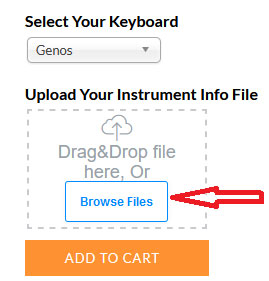
When purchasing our expansion packs, you can directly upload your Instrument Info file during the checkout process. The interface will look similar to this:
Instrument Info File Types by Keyboard Model
Different Yamaha keyboard generations use varying file formats for instrument identification:
- *.n27 (.N27) - Generated by: Genos, Tyros 5, PSR-SX900, PSR-SX700, PSR-S975, PSR-S775, PSR-S970, PSR-S770, PSR-S670, and PSR-A3000. This is the most common format required for current premium packs.
- License_id.n25 - Used by Tyros 3 and Tyros 4. This license key is generated based on your Instrument ID.
- instrument_id.n26 - The Instrument ID file for Tyros 3 and Tyros 4, required before purchasing premium content.
Step-by-Step Guide: Exporting Instrument Info Files
Export Instrument Info File From Genos 2 | Genos
To export the Instrument Info file from your Genos workstation:
- Connect a USB flash drive to the [USB TO DEVICE] port
- Press [MENU] and select the [Expansion] tab
- Touch [Export Instrument Info]
- Follow the on-screen instructions
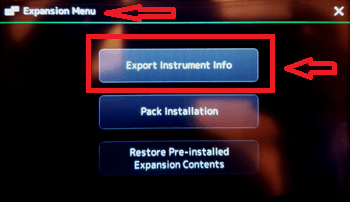
The file will be saved as "Genos_InstrumentInfo.n27" in the root directory of your USB drive.
Export Instrument Info File From TYROS 5
Exporting from Tyros 5:
- Connect a USB flash drive to the [USB TO DEVICE] port
- Press [FUNCTION] → [H] UTILITY → TAB[E][F] OWNER
- Press the [E] (EXPORT INSTRUMENT INFO) button
- Follow the on-screen instructions
The Instrument Info file will be saved to the root directory of your USB drive.
Export Instrument Info File From PSR-SX920, PSR-SX720 | PSR-SX900, PSR-SX700
For these PSR-SX models:
- Connect a USB flash drive to the [USB TO DEVICE] port
- Press [MENU] and select [Expansion]
- Touch [Export Instrument Info]
- Follow the on-screen instructions
The file will be named "PSR-SX900_InstrumentInfo.n27" or "PSR-SX700_InstrumentInfo.n27" depending on your model.
Export Instrument Info File From PSR-SX600
Exporting from PSR-SX600:
- Connect a USB flash drive to the [USB TO DEVICE] port
- Access the operation display:
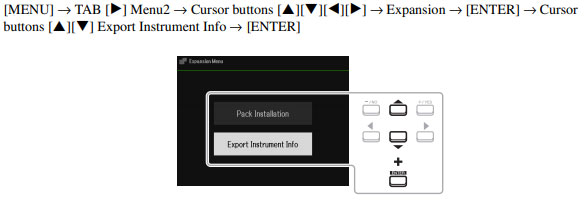
- Follow the on-screen instructions
The file will be saved as "PSR-SX600_InstrumentInfo.n27" on your USB drive.
Export Instrument Info File From PSR-S975, PSR-S775
For PSR-S975 and PSR-S775 models:
- Connect a USB flash drive to the [USB TO DEVICE] port
- Press [FUNCTION] → TAB [F] MENU 2 → [G] SYSTEM → TAB [E] OWNER
- Press the [D] (EXPORT INSTRUMENT INFO) button
- Follow the on-screen instructions
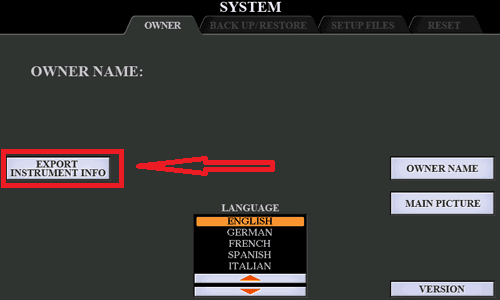
The file will be named "PSR-S975_InstrumentInfo.n27" or "PSR-S775_InstrumentInfo.n27".
Export Instrument Info File From PSR-S970, PSR-S770
Exporting from PSR-S970 and PSR-S770:
- Connect a USB flash drive to the [USB TO DEVICE] port
- Press [FUNCTION] → TAB [F] MENU 2 → [G] SYSTEM → TAB [E] OWNER
- Press the [D] (EXPORT INSTRUMENT INFO) button
- Follow the on-screen instructions
The file will be saved as "PSR-S970_InstrumentInfo.n27" or "PSR-S770_InstrumentInfo.n27".
Export Instrument Info File From PSR-S670
For PSR-S670 users:
- Connect a USB flash drive to the [USB TO DEVICE] port
- Press [FUNCTION] → TAB [F] MENU 2 → Use cursor buttons to select SYSTEM → [ENTER] → TAB [E] OWNER
- Press one of the [1 UP/DOWN]–[3 UP/DOWN] (EXPORT INSTRUMENT INFO) buttons
- Follow the on-screen instructions
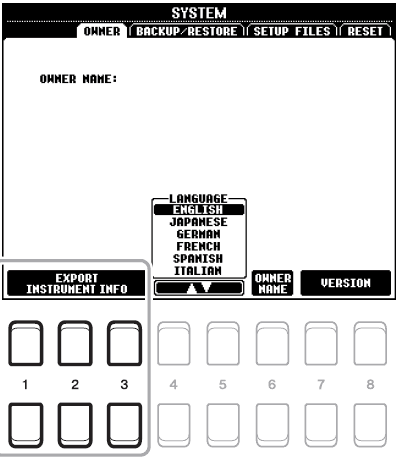
The file will be saved as "PSR-S670_InstrumentInfo.n27" on your USB drive.
Related Resources
You may also find these guides helpful:

Comments
I have a PSR-S950 keyboard and I don't see the info for it in your list, could you tell me how I can get it
Thank you